The Local Social Feed: How to Use Google Posts to Outrank Competitors in 2026
Feb 11, 2026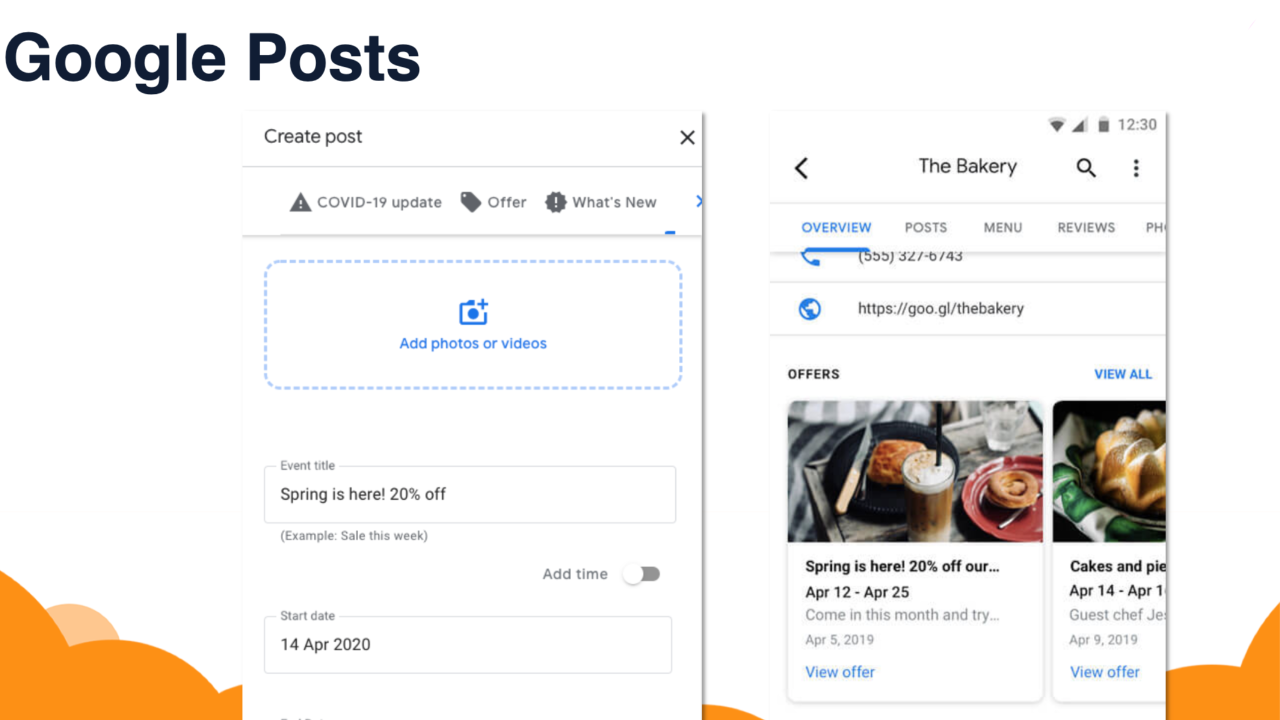
Last updated: April 2026 · Written by 20 Minute Marketing · 9 min read
The "Hidden" Social Network
When business owners think about social media, they immediately go to Facebook or Instagram. But there is a "social feed" that is far more powerful for your bank account, and it sits right inside your Google Business Profile.
In 2026, Google Posts (the "Updates" section of your profile) are no longer just optional announcements. They are "Context Signals." Every time you post an update about a service you provided in a specific suburb, you are feeding Google’s AI the exact data it needs to recommend you. If a competitor is "static" and you are "active," Google will choose you every time. This proactive approach is a cornerstone of the
Phase 1: Why Google Posts Matter More in 2026
📘 Want the full picture? Read our local SEO strategy — the complete pillar guide this article is part of.
Google’s Search Generative Experience (SGE) now pulls "snippets" from your recent posts to answer user questions.
-
The "Justification" Effect: Have you ever seen a map result that says "Their website mentions..."? Google now does this with posts too: "They recently posted an update about..." * The Trust Signal: A post from 2 days ago tells a customer you are open, active, and ready for work. A profile with no updates looks like a ghost town.
According to
Phase 2: The Three Types of High-ROI Posts
Don't just post "Merry Christmas" or generic quotes. To win at
-
The "Proof of Work" Post: Use the
geo-tagged photos -
Caption: "Just finished a full garden makeover in Forest Hill. We used native drought-resistant plants to save the client on water bills!"
-
-
The "Common Question" Post: Use your
AI FAQ database -
Caption: "Wondering how often you should service your AC? In Melbourne, we recommend an annual check before summer hits."
-
-
The "Offer" Post: Google has a specific post type for "Offers" that includes a bright yellow tag and an expiry date. These are conversion magnets.
Phase 3: The 5-Minute "AI-Powered" Posting Workflow
You don't need to be a writer to do this. Use the
The Master GBP Prompt
Take a photo of your work and tell your AI:
"I am a [Job Title] in [City]. I am uploading a photo of a [Specific Task] I did today. Write a 100-word Google Business Update. Include a hook, a mention of the suburb [Suburb Name], and a 'Call Now' button instruction. Keep it professional but local."
The Strategy: Post this at the same time you upload to Facebook or Instagram. It takes 60 extra seconds but has 10x the SEO impact.
Phase 4: Optimization Rules for 2026
Google is strict about what can go in a post. Avoid these common mistakes:
-
No Phone Numbers in Images: Google’s AI can read text inside images. If you put a phone number or a website URL in the image itself, the post may be rejected for "Spam." Use the built-in "Call Now" button instead.
-
The "Safe Zone" for Images: Google crops post images into a square or a 4:3 ratio in the "Update" carousel. Keep your main subject (and your face!) in the center of the photo.
-
Stock Photos are Blocked: In 2026, Google’s "Vision AI" can detect stock photos instantly. If you use a generic photo, the post won't help your ranking. Always use real photos.
Chapter 5: Tracking Your Results
How do you know if it's working? Go to your GBP Insights and look at "Interactions."
-
Search Queries: See if people are finding you through keywords you used in your posts.
-
Button Clicks: Track how many people clicked "Call Now" or "Visit Website" directly from a post.
As noted by
FAQ: Google Business Posts
"How often should I post?"
At least once a week. If you’re in a highly competitive industry (like plumbing or law), posting 2–3 times a week can give you a significant edge.
"Can I reuse my Facebook posts?"
Yes, but remove the "Link in bio" or "Share this post" language. Replace it with "Click the button below to book."
"What is the best 'Call to Action' button?"
For service businesses, "Call Now" is almost always the winner. For retail or professional services, "Book" or "Learn More" works best.
Conclusion: Be the Active Choice
When a customer is comparing three businesses in the Map Pack, they will click on the one that looks "alive." Google Posts are your way of proving that you are active, expert, and local. It is the most profitable 5 minutes you can spend on your marketing each week.
Ready to Automate Your Local Presence? In our
Enroll in the 20-Minute Marketing Essentials Course – Dominate Local Search
Get the complete digital marketing system built for Australian small business.
Try the Essentials Course →Want to rank higher without becoming an SEO expert?
The 20 Minute Marketing course shows time-poor business owners exactly what to do each week to climb Google — no jargon, no 40-hour audits.
Built for time-poor Australian small business owners.
You'll never need a Marketing Agency again!
Digital Marketing Courses that teach you more than an Agency ever could (or would!)