
Free SEO Chrome Extension: See Any Page the Way Google Does
Sep 27, 2026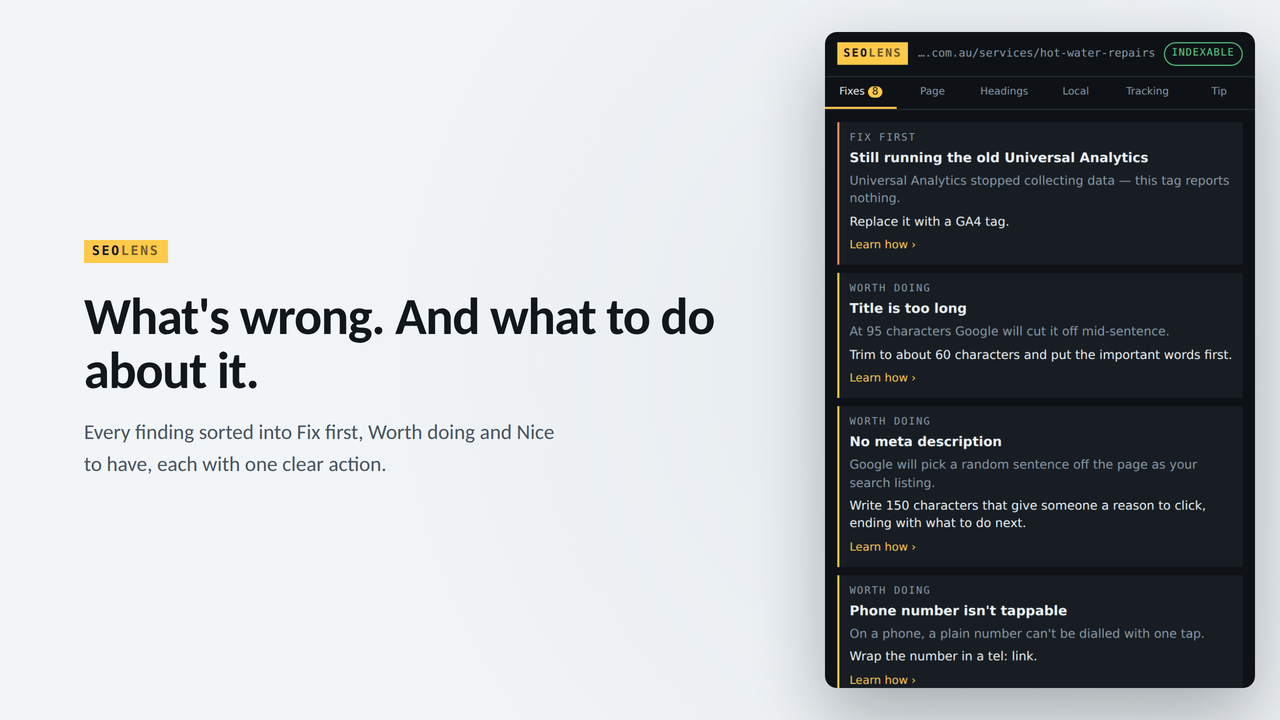
Quick answer
20 Minute Marketing SEO Lens is a free Chrome extension that shows you any web page the way a search engine reads it: the title tag, meta description, headings, links, schema, tracking tags and a prioritised list of fixes in plain English. It needs no account. If you are learning SEO, it turns every website you visit into a practice exercise.
The fastest way to learn SEO is not reading about title tags. It is opening fifty real pages and looking at what their title tags actually say, which ones are too long, which pages have two H1s and which ones forgot a meta description altogether. That is what working SEO specialists do all day, and it is the habit that separates someone who has done a course from someone who can do the job.
That is why I built SEO Lens. It is the tool I wanted when I was starting out, and it is the same kind of check I run every week leading digital for two national brands. It is free, and you can add it to Chrome from the Chrome Web Store.
Why seeing a page "the way Google does" teaches you SEO
When you look at a web page, you see design, photos and copy. A search engine sees something different: a title, a description, a heading structure, a set of links and a block of structured data that tells it what the page is about. Most beginners never see that layer, because it sits in the page code.
Once you can see it, three things happen quickly:
- You start recognising patterns. After a few dozen pages you will spot a weak title tag in seconds, the way an editor spots a typo.
- Theory becomes concrete. "Use one H1 per page" means more when you have just found a major retailer with four of them.
- You build a vocabulary for interviews. Being able to say "the canonical points at the wrong URL" is a very different answer from "I think the SEO could be better".
What SEO Lens shows you
Click the extension icon on any page and it reads that page for you. The panels are:
| Panel | What it checks | What you learn from it |
|---|---|---|
| Fixes | A prioritised list of issues sorted into Fix first, Worth doing and Nice to have | How to prioritise, which is the skill employers and clients actually pay for |
| Page | Title and meta description with character counts, canonical URL, robots directives, language, viewport, HTTPS, word count and links | The on-page basics every SEO audit starts with |
| Headings | The full H1 to H6 outline, with headings hidden by CSS struck through | How content structure works, and how sites accidentally hide headings |
| Local | Business name, address and phone, contact forms, LocalBusiness schema, opening hours, map coordinates and review markup | Local SEO, one of the most common first jobs for freelancers |
| Tracking | Analytics, advertising and session recording tags, including retired tracking code | How measurement is set up on real sites, and what breaks |
There is also a Copy report button that exports the findings as plain text, and an optional weekly tip delivered on Tuesday mornings if you want a small nudge to keep learning.
If any of those panels use terms that are new to you, start with technical SEO explained in plain English, our guide to what schema markup is and why it matters, and our guide to local SEO and "near me" searches.
A 20 minute practice exercise
Here is a practice brief you can do tonight. It uses real, public web pages, so there is nothing to set up.
- Pick three pages. One from a large national brand, one from a local business in your suburb, and one from any site you think looks a bit dated.
- Run SEO Lens on each. Note the title length, whether there is a meta description, how many H1s there are, and what the Fixes panel puts in Fix first.
- Compare. Which page is strongest on the basics? Is the big brand always better? (Often it is not.)
- Write it up. Use the Copy report button, then turn the output into five short recommendations in your own words, ranked by impact.
Do this for ten pages and you have the start of a portfolio: a set of short audits showing you can find problems, rank them and explain them in plain language. That is the core of an entry level SEO role, and it is exactly what a freelancer sends a prospective client before a first meeting. For what else belongs in one, see how career changers build a marketing portfolio.
Using it for job applications and client work
If you are changing careers, audit the website of the company you are applying to before the interview. Bring two or three specific, polite observations. It shows initiative and it shows you can do the work, not just describe it.
If you are freelancing, use the Local panel on a prospect's site. Missing LocalBusiness schema, an inconsistent phone number or no opening hours are easy, concrete fixes to lead a conversation with.
If you are a student, use it alongside your coursework. Whatever your textbook says about on-page SEO, check it against live sites and see how often real pages break the rules.
What SEO Lens does not do
It is worth being clear about the limits, so you know which other tools to learn alongside it:
- It checks one page at a time. It does not crawl a whole website.
- It does not show keyword search volumes, rankings or backlinks. Those need tools such as Google Search Console, which is free, or paid platforms.
- It reads the page as it loads in your browser. It is an inspection tool, not a guarantee of how any search engine will rank that page.
Think of it as the first tool in your kit, not the only one.
Learn the why behind every fix
SEO Lens tells you what is wrong with a page. Knowing why it matters, and what to do across a whole site, is what our SEO course teaches. It is 18 short lessons you can do in your own time, $149 paid once, with 12 months of access and tutor support from me directly. If you want the broader picture across SEO, social, paid search and email, start with our digital marketing courses.
Either way, install SEO Lens free and start looking at the web the way search engines do.
Frequently asked questions
Is SEO Lens free?
Yes. It is free to install and use, with no account or sign up.
Do I need SEO experience to use it?
No. Every issue comes with a plain English explanation, and the Fixes panel tells you which problems matter most. It is designed for people who are learning.
Does it work on any website?
It works on standard web pages you open in Chrome. Chrome does not allow extensions to run on some pages, such as the Chrome Web Store itself and browser settings pages.
Is it a replacement for tools like Screaming Frog or Ahrefs?
No. Those tools crawl whole sites and track rankings and backlinks. SEO Lens is a quick single page inspector. Most working SEO specialists use a page inspector every day alongside a crawler.
Will using it help me get an SEO job?
On its own, no tool gets you a job. What helps is being able to show real audits you have done and explain your reasoning. SEO Lens makes producing those audits fast, which is why we suggest the practice exercise above.
You'll never need a Marketing Agency again!
Digital Marketing Courses that teach you more than an Agency ever could (or would!)
